AI Exposure Management
Find every AI in your environment — including the AI nobody approved, installed, or noticed.
KeyCaliber builds a complete AI inventory from the security tools you already run, then ranks every finding by the critical systems and identities that access it.
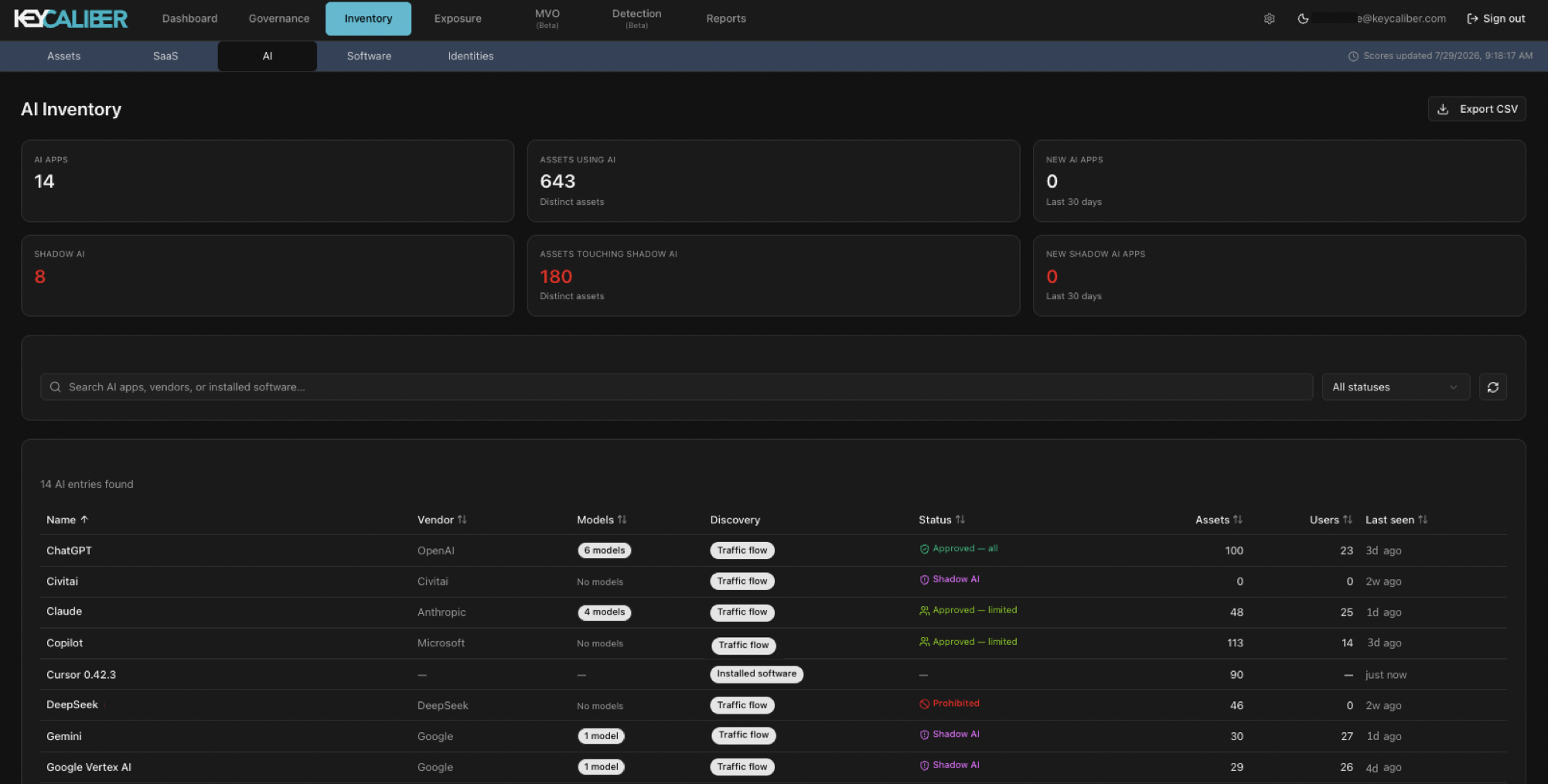
Nobody declared it. No single tool can find it.
Some of it your people signed up for. The rest arrived on its own, inside SaaS tools you approved back when those tools had no AI in them. Whatever nobody declared is your Shadow AI, and it is hard to pin down: your endpoint tool watches its own machines, your gateway watches its own traffic, and neither one knows what the other found.
Four steps. Nothing to install.
Connect
Read-only access to the tools you already run. No agent, no proxy, nothing on anyone's laptop.
Find
Every AI in use, pulled from seven different signals and merged into one list.
Act
Findings sorted by what they touch, so you start with the ones that matter.
Prove
A decision recorded on every system, and a dated register you can hand to an auditor.
What turns up.
AI installed on machines
Ollama, LM Studio and the rest, read from the software inventory your EDR and MDM already collect, then tied to the same asset your network and identity data describe.
AI inside apps you already approved
The app passed review two years ago. The AI feature arrived later, switched on by default, under the same contract nobody reopened.
AI reached from anywhere else
Traffic, DNS, gateway logs and sign-ins, including the servers and scripts nobody thinks of as users.
Which of it lands on something that matters
Anyone can tell you 400 people used ChatGPT. We tell you which of them were on the payroll server.
Works with what you already run.
Connect one tool or connect them all. Every source you add sharpens the picture.



















What teams use it for.
Get an AI inventory you can hand to an auditor
A complete list with dates, sources and decisions. The artifact the EU AI Act and ISO 42001 ask for.
Find your Shadow AI
Start from what your tools already know and see what turns up. Most first looks find something.
Approve AI for some people, not everyone
Give a tool to one team, and everyone outside that group shows up in a queue you can work.
Check whether a vendor trains on your data
A dated, sourced record of each vendor's policy, and whether their AI features are on by default.
Answer the board's AI question
How much AI, where, whose, and what it touches, with the numbers behind each answer.
Find the gaps in everything else, too
The same connections show which assets are missing endpoint protection, scanning or identity coverage.
The same picture answers more than AI.
Finding AI means first knowing every asset, who uses it and which tools are watching it. Once that exists, it answers a lot of other questions too.
One asset list
Every asset deduplicated across EDR, cloud, scanners, CMDB and identity, with each tool's view of it kept.
Shadow IT
The machines and services on your network that no security tool is watching.
Coverage gaps
Which assets are missing endpoint protection, scanning or identity. Found for you, not a query you write.
Overlapping tools
Where two tools cover the same ground, and where neither of them does.
Business impact
What each asset is worth, worked out from how it behaves and what depends on it.
Ranked exposures
Vulnerabilities and gaps ordered by the risk they actually create, not by severity label.
Why teams pick us.
Start with what matters
Findings arrive ranked by what the affected system is worth to your business, so the top of the list is the right place to begin.
See what other tools miss
A model running on someone's laptop, and an AI feature switched on inside software you already trust. The two hardest places to look are the two we were built for.
Check our work
Every finding shows where it came from. Every score breaks into the parts that made it. Nothing here asks to be taken on faith.
Skip the rollout
We read the tools you already own. No agent, no proxy, no browser extension, and no six-week deployment before anyone sees a result.
See what's running in 30 minutes.
Connect one endpoint tool and one network source. Most first looks turn up AI nobody knew about.
Request a demo